Yes, I have a repo whose sole purpose is to make my GitHub profile look busier than it is. No, I'm not ashamed. And here's how you can do it too.
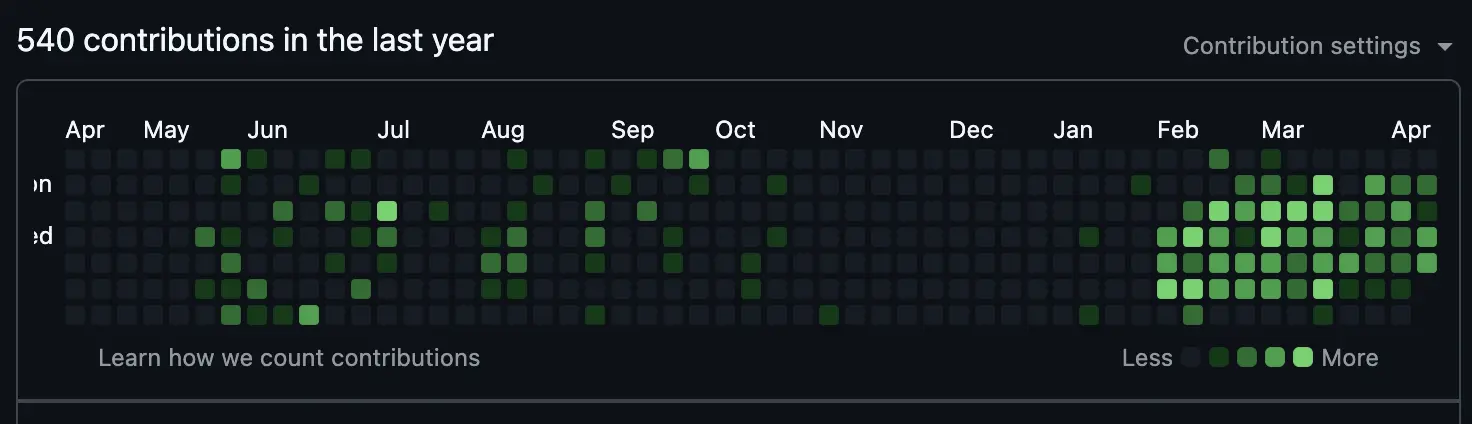
It's quite easy to spot when I started it.
How It Works
GitHub's contribution graph tracks commits across all your repos, public and private, as long as they're on the default branch and the commit email matches your account. The whole system is activity-based: it doesn't care what you committed, just that you did. Which means it's trivially gameable.
The plan is simple: a private repo, a scheduled GitHub Action as the engine, and a Python script to make it look human.
GitHub Workflow
With a free GitHub account, you have access to 2,000 minutes of free actions compute every month, so let's use that to run a 25s action. A GitHub Workflow also allows you to define cron jobs, so we can simply define one to run every day.
Create a file at .github/workflows/contributor.yml:
- First, define the trigger with a cron job:
on:
  schedule:
    # Runs at 08:00 UTC every day
- cron: '0 8 * * *'- Define the job and give it permission to push commits:
jobs:
  daily-commits:
    runs-on: ubuntu-latest
    permissions:
contents: write # Grants permission to push commits- Add the steps. First, checkout the repo:
steps:
  - name: Checkout repository
uses: actions/checkout@v3- Set up Python and install dependencies:
- name: Set up Python
  uses: actions/setup-python@v4
  with:
    python-version: '3.9'

- name: Install dependencies
run: pip install holidays- Configure git. Make sure to use the same email address as your GitHub account, else contributions will not be counted:
- name: Configure Git
  run: |
    git config --global user.name "Nathan Brodin"
git config --global user.email "nathan@brodin.dev"- Run the auto-commit script:
- name: Run Auto-Commit Script
run: python autocommit.py- Finally, push changes:
- name: Push changes
  run: git push
A Tiny Script To Make It Look Realistic
If you would make the exact same amount of commits, Monday to Sunday, even on Christmas Day, you would easily be flagged as a faker. So to make it look natural, we'll write a tiny Python script to handle that. Create a file called autocommit.py:
- First, add the imports:
import random
import subprocess
import datetime
import holidays- Define the
git_commitfunction (must come beforemain()):
def git_commit(timestamp):
    with open("activity_log.txt", "a") as f:
        f.write(f"Commit made at {timestamp}\n")

    subprocess.run(["git", "add", "activity_log.txt"])

    message = f"Update activity log: {timestamp}"
subprocess.run(["git", "commit", "-m", message])- Create the
main()function. First, get today's date and check for weekends:
def main():
    today = datetime.date.today()

    if today.weekday() >= 5:
        print("Today is a weekend. Skipping.")
return- You also skip public holidays, using the
holidayspackage:
    country_code = "NO"  # Replace with your country code
    country_holidays = holidays.country_holidays(country_code)
    if today in country_holidays:
        print(f"Today is a holiday ({country_holidays.get(today)}). Skipping.")
return- Remove days where you shouldn't be working (birthday, grandma's funeral...):
    quiet_days = {
        datetime.date(2026, 1, 1),
    }
    if today in quiet_days:
        print("Today is a quiet day. Skipping.")
return- Randomize the count of commits, and weight them to make it more natural. Make sure the sum sums up to 100.
    # Randomize Commits: 0 commits has a 32% chance, max capped at 9
    num_commits = random.choices(
        range(10),
        weights=[32, 10, 8, 8, 8, 7, 8, 8, 6, 5],
        k=1
    )[0]
print(f"Scheduled for {num_commits} commits today.")- Finally, call the commit function in a loop:
    for i in range(num_commits):
        current_time = datetime.datetime.now().strftime("%Y-%m-%d %H:%M:%S")
        git_commit(current_time)


if __name__ == "__main__":
    main()
Good job, you're now officially a 10x engineer (with a healthy work/life balance), at least visually.
Full code:
# .github/workflows/contributor.yml

name: Daily Contribution Automation

on:
  schedule:
    # Runs at 08:00 UTC every day
    - cron: '0 8 * * *'
  # Allows to run this workflow manually from the Actions tab for testing
  workflow_dispatch:

jobs:
  daily-commits:
    runs-on: ubuntu-latest
    permissions:
      contents: write # Grants permission to push commits

    steps:
      - name: Checkout repository
        uses: actions/checkout@v3

      - name: Set up Python
        uses: actions/setup-python@v4
        with:
          python-version: '3.9'

      - name: Install dependencies
        run: pip install holidays

      - name: Configure Git
        run: |
          git config --global user.name "Nathan Brodin"
          git config --global user.email "nathan@brodin.dev"

      - name: Run Auto-Commit Script
        run: python autocommit.py

      - name: Push changes
        run: git push
# autocommit.py
import random
import subprocess
import datetime
import holidays
def git_commit(timestamp):
with open("activity_log.txt", "a") as f:
f.write(f"Commit made at {timestamp}\n")
subprocess.run(["git", "add", "activity_log.txt"])
message = f"Update activity log: {timestamp}"
subprocess.run(["git", "commit", "-m", message])
def main():
country_code = "NO"
today = datetime.date.today()
# Weekend Check
if today.weekday() >= 5:
print("Today is a weekend. Skipping.")
return
# Holiday Check
country_holidays = holidays.country_holidays(country_code)
if today in country_holidays:
print(f"Today is a holiday ({country_holidays.get(today)}). Skipping.")
return
# Quiet Days Check
quiet_days = {
datetime.date(2026, 1, 1),
}
if today in quiet_days:
print("Today is a quiet day. Skipping.")
return
# Randomize Commits — 0 commits has a 32% chance, max capped at 9
num_commits = random.choices(
range(10),
weights=[32, 10, 8, 8, 8, 7, 8, 8, 6, 5],
k=1
)[0]
print(f"Scheduled for {num_commits} commits today.")
for i in range(num_commits):
current_time = datetime.datetime.now().strftime("%Y-%m-%d %H:%M:%S")
git_commit(current_time)
print(f"Commit {i+1}/{num_commits} created.")
if __name__ == "__main__":
main()